Custom Web Portal Development Services for Teams That Need Portals Built Around Real Users and Real Workflows
BitBytes designs and builds custom web portals for customers, partners, vendors, employees, and other role-based users who need more than a standard website.





What custom web portal development means
Building a secure, logged-in digital workspace where specific users can access the information, tools, and actions relevant to them.
That might mean a customer portal for account management, a vendor portal for document exchange, an employee portal for internal workflows, or a guided application portal that helps users complete a process step by step.
What custom web portal development usually helps you solve
A custom web portal is usually the right move when different users need one secure system, but not the same access, actions, or workflow visibility.
Good portal development is not just front-end work. It includes roles, permissions, integrations, data flow, usability, and the admin controls needed to keep the portal workable after launch.
BitBytes is best suited to teams building customer portals, client portals, vendor portals, employee portals, and guided application or service portals tied to real operations.
If the workflow is complex, the user roles are different, or the integration layer matters, discovery and solution design is often the best starting point.
How a web portal is different from a standard website
Website
Portal
Built to inform, market, or convert
Built for users to log in and complete actions
Same content for all visitors
Personalized views based on user role
Public-facing, no auth required
Role-based access and permissions
Static or CMS-driven pages
Dashboards, forms, approvals, status tracking
Limited system integrations
Connected to CRM, ERP, APIs, and internal tools
Focused on traffic and conversion
Focused on workflow efficiency and self-service
Common business problems custom web portals help solve
Teams usually do not ask for a portal first. They ask for a way to reduce operational friction.
The patterns we see before teams reach out:
Users still depend on email or support teams for routine actions
If customers, vendors, partners, or internal staff need to request updates manually, download documents from email threads, or ask for help with basic tasks, a portal can move that work into self-service.
Different user groups need different access and different actions
A lot of businesses need one system for multiple user roles, but not one identical experience. A portal helps when permissions, dashboards, workflows, and next steps need to change by user type.
Your workflow crosses too many systems
When the real process lives across CRM, ERP, spreadsheets, support tools, payment systems, and manual handoffs, the portal becomes the user-facing layer that makes the experience clearer.
You need visibility, not just access
A good portal does more than expose data. It helps users understand status, next actions, approvals, tasks, and documents in one place.
The current portal or login area feels bolted on
Many teams already have a portal of some kind, but it is hard to extend, hard to use, or disconnected from how the business actually works. That is often where redesign, modernization, or a rebuild becomes necessary.
Sounds familiar? We have helped teams turn manual workflows and disconnected user experiences into portals that work the way the business does.
What kinds of web portals we build
Portal development is a broad category, but most projects fall into a few recognizable patterns.
Customer portals
Secure self-service portals for account access, requests, subscriptions, support actions, service history, and ongoing customer interaction.
Client portals
Portals that help clients manage deliverables, track status, exchange documents, approve work, or stay aligned with ongoing services.
Vendor and partner portals
Role-based portals for coordination, onboarding, procurement workflows, shared documents, communication, and operational visibility across external stakeholders.
Employee and internal portals
Internal systems that centralize requests, approvals, documents, workflows, reporting, and collaboration across teams.
Application and service portals
Guided portal experiences where users move through forms, steps, validations, document uploads, and service actions with less friction and fewer support dependencies.
Operational and multi-role portals
Portals built around workflow-heavy environments where different users need dedicated dashboards, actions, and access across the same system.
What is included in custom web portal development at BitBytes
Portal development support across the parts of the lifecycle that matter most in practice.
Portal discovery and workflow mapping
Understanding user roles, business processes, and systems involved to define what the portal needs to make easier.
Portal UX and information architecture
Navigation, user journeys, dashboards, and screen structure designed around real usage patterns.
Role-based access and permissions
Defining who can see, do, approve, and manage what - often the most important part of portal work.
Portal development and backend logic
Frontend, backend, APIs, user management, and business logic required to make the portal function reliably.
Integrations and data flow
Connecting to CRMs, ERPs, payment systems, document tools, and third-party platforms.
Dashboards, forms, and workflow control
Application flows, task visibility, approvals, document handling, notifications, and status tracking.
QA, release, and post-launch support
Testing, launch support, release stabilization, and continued improvements after go-live.
Portal modernization and improvement
Extending, redesigning, or replacing weak flows in existing portals with something more maintainable.
Why teams choose BitBytes for custom web portal development
We start with the workflow, not the interface
A portal only works when the user journey matches the business process underneath it. We start from roles, handoffs, permissions, integrations, and outcomes.
We build for real operating conditions
Portal projects tend to break down in the messy parts: edge cases, approvals, external systems, role differences, and admin overhead. We account for those early.
We treat usability as part of the system
A portal is often used repeatedly by the same people. If it is slow, confusing, or overloaded, adoption drops fast. We focus on structure and usability, not just implementation.
We can build new portals or improve existing ones
Some teams need a portal from scratch. Others need help fixing what already exists. We support both paths.
We stay close to delivery
BitBytes is built for teams that want direct communication, practical execution, and less distance between the people defining the work and the people shipping it.
Delivery Quality
PortalsWhat you get working with us
Selected portal-related work
The best proof of portal capability is the kind of role-based systems a team has already helped build.

Kindergeld Made Simple
A guided, paperless Kindergeld application: answer step-by-step questions, let the site create and dispatch your forms to the Familienkasse, and use the FAQ/contacts if you need help
View case study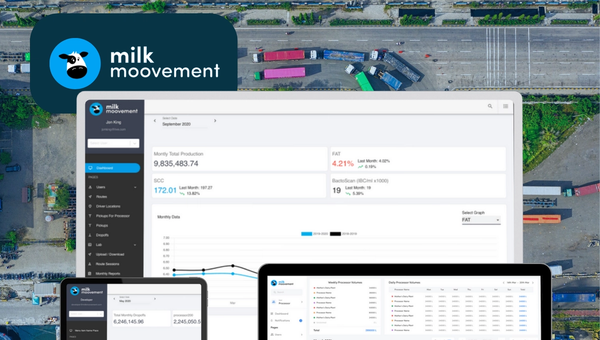
Milk Moovement: The Operating System for Modern Dairy Co-ops
Milk Moovement is a cloud platform that gives dairy co-ops a real-time command center—from farm pickup to plant intake. It streamlines routing and scheduling, unifies quality and volume data, and automates complex payments, replacing spreadsheets with a single source of truth. The result: fewer miles, faster payouts, and smarter decisions across the dairy supply chain.
View case studyHow custom web portal projects work at BitBytes
Most successful portal projects follow a clear lifecycle: define the workflow, map the roles, design the experience, build the system, test the logic, and improve after launch.
Discovery and portal definition
We begin by understanding the user groups, workflow stages, permissions, integrations, and the outcomes the portal needs to improve.
Solution architecture and project planning
Once the direction is clear, we define the portal structure, technical approach, data flows, dependencies, milestones, and release plan.
UX, development, and quality assurance
We move through product design, frontend and backend development, API work, and QA in a way that keeps the portal usable, maintainable, and aligned with the agreed workflow.
Release, stabilization, and improvement
After launch, we support stabilization, resolve friction points, and continue with next-phase improvements where the portal needs to evolve.
Delivery Outcomes
Who this is best for
Quick fit check
Does your situation match?
Operations-heavy businesses
Teams coordinating service delivery, case handling, scheduling, approvals, partner workflows, or internal process visibility.
Businesses with external user workflows
Companies that need customers, clients, vendors, or partners to access services, information, or process steps in a structured way.
Product and platform teams
Teams turning a workflow into a usable digital product or improving a portal that already exists but needs stronger execution.
Lean internal teams that need dependable delivery
Founders, CTOs, and product leads who know what the portal needs to achieve and want a partner who can help define and ship it responsibly.
When custom web portal development is the right move, and when it is not
Custom web portal development is the right choice when
Custom web portal development is usually not the right choice when
Different users need different permissions, views, and actions.
A simple informational site or basic web form would solve the problem well enough.
The portal needs to connect to real systems and real workflows.
The workflow is still too vague to define responsibly.
Self-service, visibility, document handling, forms, approvals, or status tracking matter.
The project is being treated as a cheap placeholder rather than a serious operational tool.
The portal is important enough to justify proper design and implementation.
The buying process is focused only on hourly rate, not on usability, reliability, or long-term maintainability.
Frequently Asked Questions
Answers to common questions about custom web portal development, what it includes, and how to get started.
Need a portal that actually fits the way your users and teams work?
Tell us who the portal is for, what the workflow looks like today, and where the friction is. We will help you define the right starting point, the right delivery path, and whether BitBytes is the right fit for the work.
Book a Discovery Call
with a Custom Web Portal Specialist