UI/UX Design Services for Web and Mobile Products
BitBytes helps growing software and workflow-heavy businesses improve product usability, redesign complex interfaces, and create cleaner web and mobile experiences that are easier to use and easier to ship.








What UI/UX design services really help you improve
Clearer product structure across web and mobile experiences
Better onboarding, navigation, and task completion in complex workflows
More consistent interfaces through reusable UI patterns and design systems
Cleaner collaboration between design, product, and engineering teams
More confident redesign decisions grounded in product reality, not guesswork
Who this UI/UX design service is built for
This service is best suited to teams that already have a product, a workflow, or a clear delivery need and want serious design support that improves usability and helps execution move faster.
Product-led SaaS teams improving an active product
Teams with a live platform, roadmap pressure, and growing UX debt often use this service to improve product clarity, reduce friction, and support stronger adoption.
Operations-heavy businesses with workflow complexity
Businesses running support, service, logistics, or internal workflows often need interfaces that help teams move faster and make fewer mistakes.
Founders and product leaders planning a redesign
This is a strong fit when the need for redesign is clear, but the right scope, flow structure, and handoff path still need to be shaped carefully.
Lean teams that need senior external execution
Teams without enough internal design bandwidth often use this service to move important work forward without adding heavy overhead.
Products with inconsistent UI and weak design systems
Where screens have grown unevenly over time, this service helps create stronger structure, reusable patterns, and a more stable interface foundation.
Companies that need design and engineering to work closely
A good fit usually looks like a team that wants design decisions to support actual product delivery, not sit separately from implementation.
Selected UI/UX and product experience work
The case studies below are included as practical proof of how BitBytes approaches product UX, interface clarity, and real delivery support across different digital experiences.
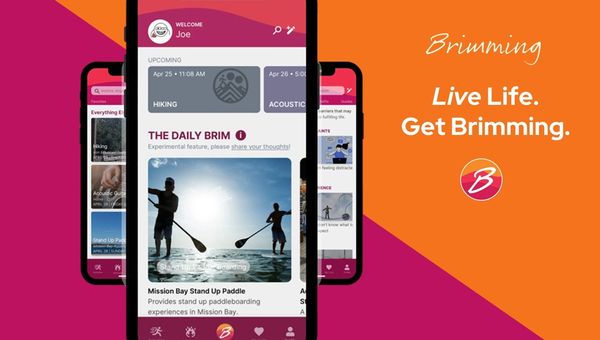
Brim Living (Brimming): Agentic AI for Real-World Growth
Brim Living’s Brimming app blends agentic AI and human expertise to help people build habits, stay motivated, and act on personalized recommendations—turning intention into lasting behavior change.
View case study
The Rank Masters (TRM) - B2B SaaS SEO that Turns Rankings into Revenue
A SaaS-only SEO partner that maps search intent to revenue actions, ships BOFU/MOFU content, optimizes for AI Overviews, and proves impact in dashboards tied to demos, trials, and ARR
View case study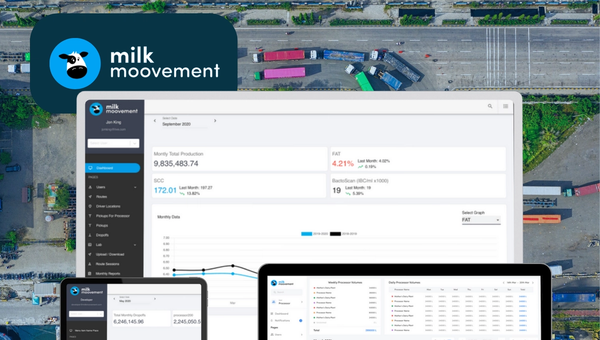
Milk Moovement: The Operating System for Modern Dairy Co-ops
Milk Moovement is a cloud platform that gives dairy co-ops a real-time command center—from farm pickup to plant intake. It streamlines routing and scheduling, unifies quality and volume data, and automates complex payments, replacing spreadsheets with a single source of truth. The result: fewer miles, faster payouts, and smarter decisions across the dairy supply chain.
View case studyWhere product teams usually feel the friction
Many teams do not have a design problem in theory. They have a product problem in practice. The interface has become harder to use, harder to extend, or harder to hand off cleanly as the product grows.
The most common product design friction points:
Complex workflows become hard to follow
As products add features, states, and exceptions, the user journey often becomes harder to understand and slower to complete.
Onboarding and feature adoption stay weaker than expected
Useful capabilities can remain underused when interface structure, guidance, and flow design do not support fast understanding.
Redesign needs are clear, but the scope is not
Teams often know the current product experience is no longer strong enough, but they need help deciding what to change first and how deeply to redesign.
UI patterns drift across the product
When screens evolve without a stronger system behind them, the result is inconsistency, duplicated effort, and a less reliable user experience.
Design handoff creates delivery friction
Even good design work can stall if engineers receive unclear specs, incomplete states, or weak collaboration around implementation details.
Internal teams do not have enough bandwidth for focused UX work
Product and engineering teams often stay busy shipping, which leaves too little room for research, redesign thinking, interface cleanup, or system-level design improvement.
These are the kinds of product friction points that make serious UI/UX design support worth investing in rather than continuing to work around.
Why businesses choose UI/UX design support now
This work usually becomes urgent when product complexity, user expectations, and delivery pressure start moving faster than the current product experience can support.
Products are getting more complex than their UX foundations
As platforms expand, usability problems become harder to ignore because navigation, task flow, and information structure carry more operational weight.
User expectations across web and mobile are higher
Buyers and end users now expect clearer journeys, faster comprehension, and less interface friction across every important touchpoint.
Design debt slows both product quality and shipping speed
Weak patterns, uneven screens, and unclear design logic create drag for product, engineering, and QA at the same time.
Workflow-heavy and AI-enabled products need clearer interaction design
As tools become more feature-rich, users need stronger guidance, structure, and interface confidence to complete work effectively.
Teams want practical improvement without adding unnecessary overhead
Many companies would rather work with a focused partner that can improve product experience and support delivery than build a larger internal process around it.
What BitBytes helps you improve through UI/UX design
This service is structured around practical product improvement. The work is shaped to help teams make better product decisions, produce stronger interfaces, and support cleaner execution from design through handoff.
Discovery and UX research
Understanding the product, users, and friction points so design decisions are tied to real conditions.
Information architecture and user flows
Reorganizing screens, paths, and task sequences so users move through the product with less friction.
Wireframes and prototypes
Early structures and interactive flows that help teams evaluate direction before implementation begins.
UI design and design systems
Reusable patterns, screen logic, and interface behavior so the product feels coherent and easier to extend.
Developer-ready handoff
Annotated designs, collaboration assets, and review support that help engineering ship with clarity.
How the UI/UX design process works
The process is built to move from product understanding to clearer design decisions, structured outputs, and cleaner delivery support.
Review the product, goals, and redesign scope
The work starts by aligning on the business context, product maturity, user problems, workflow complexity, and what needs to improve first.
Audit the current experience and map friction points
BitBytes reviews existing screens, navigation, flows, and known usability issues to find where product friction is affecting users and teams most.
Shape flows, structure, and interface direction
User journeys, page logic, task flows, and content structure are refined so the product becomes easier to understand and easier to move through.
Create wireframes, prototypes, and visual UI direction
Key screens and journeys are developed into reviewable design outputs that help the team evaluate layout, interaction, and overall experience quality.
Build reusable patterns and handoff-ready assets
Where appropriate, components, states, and design rules are organized into a system that supports cleaner implementation and future consistency.
Support handoff, feedback, and design QA
The final stage focuses on practical collaboration with product and engineering so what gets designed can be implemented with fewer gaps and less rework.
Design Outcomes
What you get from this design process
Product environments where this service is especially useful
This service is most valuable in product environments where usability directly affects delivery speed, workflow clarity, or user confidence.
B2B SaaS products
SaaS platforms often need clearer flows, stronger onboarding, and better screen logic as product scope expands.
Internal tools and operational platforms
Internal systems benefit from UI/UX work when teams need faster handling, lower friction, and clearer task completion inside complex workflows.
Support-heavy service businesses
Businesses with customer-facing or team-facing digital processes often need interfaces that reduce repetitive friction and improve consistency.
Logistics and coordination software
Where users manage moving parts, updates, or exceptions, the product experience must support fast decisions and cleaner workflows.
Healthcare and service interfaces with process complexity
These environments often need structured UX thinking because clarity, navigation, and screen logic affect daily execution.
Multilingual or GCC-facing digital products
Products serving multilingual or region-specific operating environments often benefit from more careful UX structure, interface clarity, and product flow consistency.
What stronger UI/UX design changes in practice
The most useful outcomes are not abstract. They show up in how the product feels, how teams work, and how confidently improvements can be shipped.
UX Quality Score
After redesignProduct experience after UI/UX improvements
Clearer user journeys
Users can understand where to go next, what to do, and how to complete important actions with less hesitation.
Better onboarding and feature discovery
Important parts of the product become easier to find, understand, and adopt.
More consistent interfaces across the product
Reusable patterns help reduce visual drift and create a more stable product experience.
Lower friction in complex workflows
Multi-step tasks, role-based flows, and data-heavy screens become easier to navigate and complete.
Cleaner handoff from design to engineering
Design outputs become more usable for delivery, which supports better collaboration and fewer avoidable gaps.
More confidence in redesign and product decisions
Teams gain a clearer basis for deciding what to improve, what to simplify, and how to move forward without guessing.
When this service is the right fit and when it is not
Best fit
Not the right fit
Teams with an active product that needs clearer UX, redesign support, or stronger interface consistency
Teams looking only for a fast visual refresh with no product thinking behind it
Founders, product leaders, or engineering teams that want practical design work tied to real delivery
Buyers looking for speculative free strategy or unpaid deep discovery
Products with workflow complexity, usability friction, or weak design systems
Projects that are purely brochure-style web design with no meaningful UX scope
Companies that value close design and engineering collaboration
Buyers comparing only on lowest-cost commodity design output
How the design and delivery stack is structured
The stack is organized around function first so both product and technical stakeholders can understand how the work moves from research to handoff and iteration.
Research and discovery layer
Stakeholder input, product walkthroughs, user-flow mapping, and working-session tools such as FigJam or Miro help clarify context before design direction is shaped.
UX architecture layer
Information architecture, task flows, journey mapping, and wireframe logic are used to improve structure and reduce workflow confusion.
Wireframing and prototyping layer
Clickable prototypes and review-ready flows help teams test direction, understand interaction patterns, and make earlier design decisions with more confidence.
UI and design system layer
Figma-based interface design, reusable components, pattern libraries, and design tokens or documentation support stronger consistency across the product.
Collaboration and handoff layer
Annotated designs, developer-ready specs, async reviews, and design QA support help engineering teams implement work more cleanly.
Analytics and optimization layer
Event review, behavior analysis, session recordings, and experimentation inputs can help validate where friction exists and where design improvement matters most.
Recommended delivery base
A Figma-centered workflow, structured review cycles, and close collaboration with product and engineering create a delivery base that supports both quality and speed.
Frequently Asked Questions
Common questions about UI/UX design services, what they include, and how to get started.
Talk through the product, the friction, and the right scope
A good next step is a focused working conversation about where the product experience is slowing users or teams down, what kind of UI/UX work is actually needed, and how to shape the effort in a way that supports real delivery.
Book a Discovery Call
with a UI/UX Design Expert