Customer Support Automation Solutions for Growing Support Teams
Reduce repetitive support work, improve answer consistency, and connect to your existing systems. From ticket triage and agent-assist to retrieval-backed answers with clear escalation paths.








Who customer support automation solutions are best suited for
Customer support automation works best when a team has enough recurring support volume, enough operational complexity, or enough quality pressure that manual handling is starting to become a bottleneck.
Quick fit check
Does your situation match?
Teams managing repetitive ticket volume
For teams handling the same questions and routing decisions daily, where repetitive work pulls agents away from higher-value conversations.
SaaS teams needing in-app support
Product-led teams that need in-app help, contextual responses, and smoother handoff into human support when issues go beyond self-service.
Businesses with fragmented knowledge
Teams where knowledge is scattered across docs, help centers, and tribal knowledge, leading to inconsistent answers across channels.
Operations-heavy support environments
Support that involves order updates, account actions, status checks, or routing logic - where automation needs to connect to real workflow context.
Leaders scaling without matching headcount
Teams that need better coverage and efficiency without forcing every growth milestone to require the same increase in manual support effort.
What customer support automation solutions actually improve
Faster first-response handling for common support requests
More consistent answers across channels, shifts, and support agents
Better ticket routing, escalation logic, and handoff quality
Stronger use of existing support knowledge and internal documentation
More scalable support operations without relying only on manual expansion
Where is my order? It was due Friday.
Intent: order statusCase studies that show how BitBytes works in real product and workflow environments
These help qualified buyers understand the type of delivery partner BitBytes is: practical, implementation-aware, and comfortable where product experience, workflow logic, and operational context intersect.
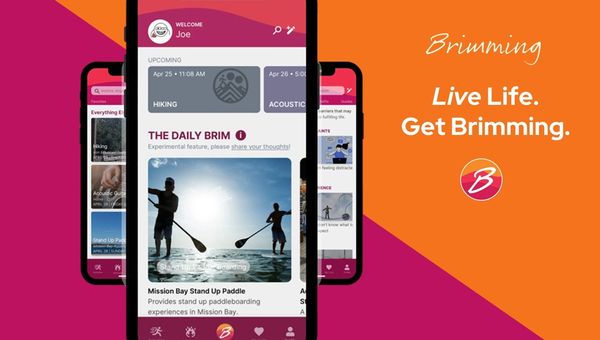
Brim Living (Brimming): Agentic AI for Real-World Growth
Brim Living’s Brimming app blends agentic AI and human expertise to help people build habits, stay motivated, and act on personalized recommendations—turning intention into lasting behavior change.
View case study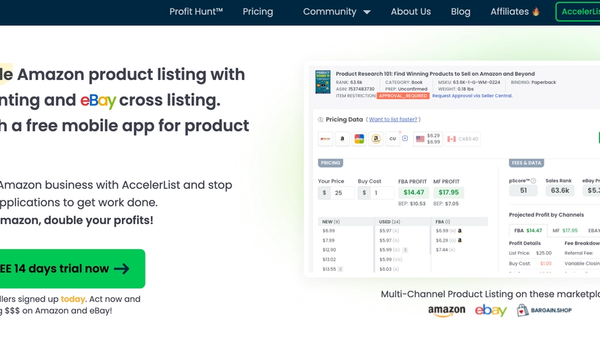
AccelerList — List Faster, Reprice Smarter, Sell on Amazon & eBay
Amazon listing, repricing, and accounting in one tool—plus seamless eBay cross-listing with inventory sync to expand reach without extra busywork.
View case study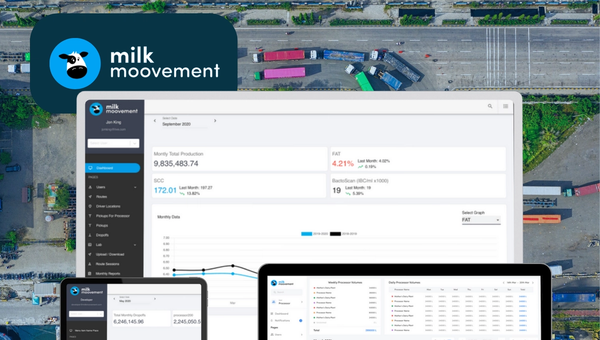
Milk Moovement: The Operating System for Modern Dairy Co-ops
Milk Moovement is a cloud platform that gives dairy co-ops a real-time command center—from farm pickup to plant intake. It streamlines routing and scheduling, unifies quality and volume data, and automates complex payments, replacing spreadsheets with a single source of truth. The result: fewer miles, faster payouts, and smarter decisions across the dairy supply chain.
View case studyThe support problems this service is designed to solve
Customer support automation is most useful when it is applied to specific operational problems, not abstract AI ambitions. These are the common patterns where the service tends to create the most value.
Repetitive support volume is consuming too much agent time
When a large share of incoming support work is repetitive, manual handling becomes an expensive way to manage predictable demand. This often slows the team down and leaves less room for complex or high-value customer issues.
Support knowledge is fragmented across too many sources
Answers become inconsistent when support teams rely on scattered documents, help center articles, internal notes, product knowledge, and informal workarounds. Automation struggles too unless knowledge is structured and accessible.
Customers are getting different answers depending on channel or agent
Inconsistent answers create trust problems and operational drag. This often happens when support processes are under-documented, when knowledge changes frequently, or when agents have to interpret too much on the fly.
Routing and escalation are too manual or too slow
A support process breaks down when tickets are not getting to the right place fast enough, when escalation triggers are unclear, or when human handoff loses the context already gathered earlier in the interaction.
Existing tools are not well connected to the support workflow
Support teams often have a helpdesk, CRM, knowledge base, internal tools, and reporting systems, but the workflow between them is still manual. That creates friction for both customers and agents.
Coverage expectations are rising while efficiency pressure stays high
Businesses increasingly need faster responses, better availability, and stronger quality control without expanding support teams at the same rate. That creates pressure to automate the right work without lowering the quality bar.
Sounds familiar? We have helped teams turn these support challenges into more efficient, more consistent, and more scalable operations.
Why customer support automation becomes a priority now
This is rarely a future-facing experiment for long. It usually becomes urgent when support demand, quality expectations, and operational complexity are all rising at the same time.
Support expectations are higher than they were even a year ago
Customers increasingly expect quick, useful responses and better self-service. Long wait times and inconsistent handling now stand out more sharply, especially in digital products where support is part of the overall user experience.
Headcount cannot be the only scaling plan
Many businesses are trying to improve support coverage and responsiveness without solving every growth problem by hiring more agents. Automation becomes attractive when the current model is reliable but too manual to scale efficiently.
Knowledge sprawl is starting to affect answer quality
As products, policies, workflows, and internal documentation evolve, support teams often feel the effects before leadership does. When knowledge is harder to trust or harder to access, both customer experience and team efficiency start to slip.
The tooling is mature enough to connect AI to real workflows
For many teams, the question is no longer whether support automation is possible. The more useful question is where it should be applied first, how it should connect to real systems, and how human escalation should be designed.
Delay usually compounds operational debt
The longer repetitive support work, weak routing, and inconsistent answers remain unresolved, the more those issues become embedded in the operating model. Acting now helps reduce the drag before it becomes harder to unwind.
What BitBytes builds as part of a customer support automation solution
This service is designed to improve support operations in practical terms. The focus is not on adding a chat layer for its own sake. The focus is on reducing repetitive work, improving answer quality, and connecting automation to the business systems that already shape support outcomes.
Customer-facing support automation
We help build support experiences that can answer common questions, guide users through tasks, surface relevant help content, and handle predictable support flows across web, app, or help-center environments.
Agent-assist and knowledge-backed response support
This can include internal support tools that help agents retrieve better answers faster, work from the right knowledge sources, and keep responses more consistent without forcing every issue into full automation.
Ticket triage, routing, and escalation design
A practical solution often includes classification, routing logic, escalation rules, and human handoff design so that issues move more cleanly through the support process instead of bouncing between queues.
Workflow-connected support automation
Where relevant, support automation can connect to helpdesk platforms, CRM systems, internal tools, and structured workflows so the experience is grounded in real account context, process logic, and operational reality.
How customer support automation solutions are typically delivered
A good implementation starts with scope discipline. The goal is to automate the right support workflows first, connect them to the right systems, and create a support experience that remains governable after launch.
Audit incoming support patterns and current workflow friction
The first step is understanding what support requests recur, where agents lose time, where quality breaks down, and which channels, tools, and knowledge sources currently shape the workflow.
Define the automation boundary and escalation rules
This stage clarifies what should be automated, what should be assisted, and what should always move directly to a human. It also defines failure paths, escalation triggers, and confidence boundaries.
Structure the knowledge and response logic
Support automation depends on the quality of the underlying knowledge. This step focuses on source selection, retrieval approach, answer shaping, content gaps, and the logic needed to keep outputs useful and grounded.
Connect helpdesk, CRM, and workflow systems
Where the use case requires it, the automation layer is connected to the operational tools that matter most. That may include ticketing platforms, CRM records, account data, internal systems, or action-oriented workflows.
Test the experience with real support scenarios
Before launch, the system should be tested against real support questions, edge cases, escalation paths, and workflow conditions. The goal is not just technical function. It is support usefulness.
Launch with monitoring, review, and iteration in place
Support automation improves through evaluation and feedback. After launch, the focus shifts to answer quality, escalation performance, failure patterns, workflow gaps, and continuous refinement.
Delivery Outcomes
Where customer support automation solutions tend to fit best
This offer is relevant across multiple business types, but it is especially useful in environments where support demand is recurring, digital, and tied closely to product or operational workflows.
SaaS products with active user workflows
SaaS teams often benefit from support automation when users need help inside the product, when support volume grows with adoption, and when product knowledge needs to be reflected more accurately in support responses.
Ecommerce and multi-brand commerce operations
Commerce businesses often deal with recurring support categories, order-related questions, policy lookups, and status updates. Automation can help reduce repetitive handling while improving consistency and routing.
Marketplace and platform businesses
Marketplace environments often have multiple user types, more conditional workflows, and more coordination across systems. Support automation is especially valuable when routing, context, and escalation need to stay structured.
Logistics and operations-heavy software environments
In operational software settings, support often overlaps with process execution, coordination, or status-dependent workflows. That makes system-connected automation more relevant than a generic conversational layer.
Subscription and recurring-service businesses
Recurring-service environments often benefit from stronger self-service, better retention-related support handling, and more efficient management of common request types across the customer lifecycle.
What a well-scoped customer support automation solution can improve
The value of this service is operational. The goal is to improve how support work is handled, how reliably knowledge is used, and how well the business can scale without lowering service quality.
Faster first-response handling
Common support requests can be acknowledged and resolved more quickly when the right workflows are automated and the right knowledge is made accessible at the start of the interaction.
More consistent support answers
A retrieval-backed and workflow-aware support layer can reduce variation across channels and agents, which helps improve trust, clarity, and internal alignment.
Lower repetitive workload for the support team
Automation helps remove predictable work from the queue so human agents can focus more on complex cases, exceptions, and higher-value customer conversations.
Better routing and escalation quality
When requests are classified more clearly and handed off with the right context, support operations become more efficient and customers spend less time repeating the same issue.
Stronger support coverage without matching every demand increase with headcount
This helps the business improve responsiveness and capacity in a more scalable way, especially when support growth is outpacing the current operating model.
Clearer visibility into support workflow performance
A better automation layer can also create cleaner signals around request types, failure points, escalation patterns, and knowledge gaps, which makes the support function easier to improve over time.
When BitBytes is the right fit for customer support automation solutions
This section is meant to qualify fit honestly. Customer support automation works best when the business has real workflow needs and is looking for a practical implementation partner, not a surface-level AI add-on.
We are a strong fit if
We are probably not the right fit if
Teams with recurring support workflows that are ready to be mapped, scoped, and improved
Businesses looking for instant results without defining workflows, knowledge quality, or escalation rules
Companies that need custom support automation connected to helpdesk, CRM, product, or internal systems
Teams that only want a generic plug-in bot with no customization or workflow thinking
Buyers who care about answer quality, operational fit, and governed handoff to humans
Organizations expecting fully autonomous support across all cases regardless of risk or complexity
Product and operations-heavy businesses that need implementation depth, not just prompt styling
Low-complexity use cases where a simple off-the-shelf FAQ widget is already sufficient
How the technical stack is typically structured
The exact stack depends on the workflow, channels, and systems in scope. The useful way to explain it is by function first, then by representative technologies that may fit that layer.
Experience and channel layer
This is where support interactions actually happen, such as embedded web support, in-app experiences, help center search, agent surfaces, or internal support tools.
Retrieval and knowledge layer
This layer is responsible for turning support knowledge into something the system can actually use. That can include help center content, internal documentation, policy sources, product docs, and curated support knowledge pipelines.
Knowledge index / vector layer
When retrieval-backed support is needed, indexed knowledge and semantic search infrastructure help the system locate the right source material.
Model, orchestration, and guardrails layer
This layer handles reasoning, response generation, routing logic, and tool use where needed.
Integration and action layer
This is where the support automation connects to helpdesk systems, CRM records, internal APIs, and workflow tools.
QA, analytics, and observability layer
Support automation needs review and monitoring after launch.
Recommended delivery base
For most custom delivery work, the best base is a maintainable application and integration architecture that fits the business.
Frequently Asked Questions
Common questions about customer support automation solutions
Explore where customer support automation fits in your support operation
A practical first conversation usually makes the next step clearer. It helps separate high-value automation opportunities from lower-value ones and gives the team a better sense of scope, complexity, and likely implementation priorities.
Book a Discovery Call
with a Support Automation Expert