Automate multi-step workflows across your business with AI, system integrations, and human control
We help businesses design and implement AI workflow automation for support, operations, and back-office processes - classifying work, routing cases, triggering actions, managing approvals, and keeping operators in control across CRM, helpdesk, ERP, email, and internal tools.







What AI workflow automation services really help you solve
Replace repetitive coordination, data movement, and approval chasing with structured workflow execution.
Connect AI decision-making to real systems so workflows can read context and take action.
Improve routing, escalation, and exception handling across support, operations, and internal teams.
Reduce manual handoffs between CRM, helpdesk, ERP, dashboards, email, and internal systems.
Add visibility, auditability, and operator control to workflows that need to scale without becoming harder to manage.
Two workflow automation examples that show how BitBytes approaches real operational delivery
These proof stories show two different workflow environments where the value comes from structured progression, system actions, and reduced manual effort.
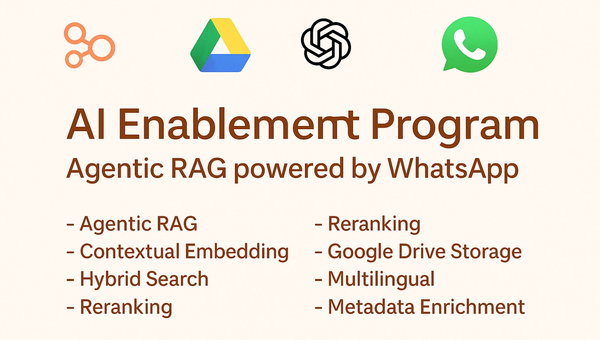
Agentic WhatsApp RAG for KSA — Accurate, Secure, Multilingual
WhatsApp-native Agentic RAG for KSA: auto-ingest from Google Drive, contextual embeddings with metadata enrichment, hybrid search with Cohere reranking, secure file links, and full Arabic/English support
View case study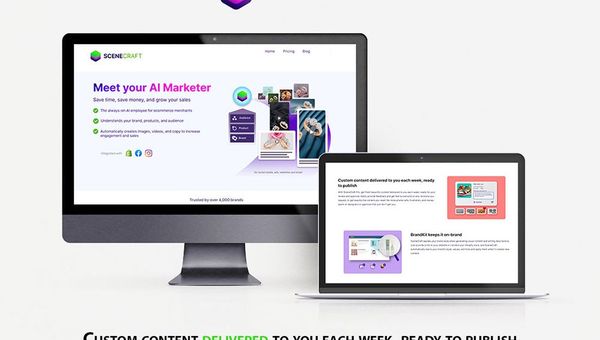
SceneCraft AI — Generate, Refine, and Publish Social Posts at Scale
Create on-brand posts in minutes: generate with custom models, refine with an AI-guided studio, add OpenAI copy, and publish to Instagram—optionally pulling products straight from Shopify.
View case studyWho this service is best suited for
This service is for businesses with workflow friction they can already feel. The strongest fit is usually a workflow with clear volume, multiple systems, operational ownership, and enough complexity that simple automation has stopped being enough.
Support-heavy and operations-heavy businesses
A strong fit for businesses dealing with repetitive service requests, operational updates, triage, approvals, and internal follow-up across multiple systems.
Businesses running workflows across several tools and teams
Useful when one process touches CRM, helpdesk, ERP, dashboards, email, communication tools, or internal systems and currently depends on manual coordination.
Multilingual and GCC-facing service environments
Especially relevant where workflows span languages, customer communication channels, and operational systems, and where consistency matters as much as speed.
Product-led SaaS and lean software teams
Also relevant for product teams that want to automate internal or user-facing workflows inside an active product without adding a large consulting layer or fragmented tooling setup.
Why this becomes a priority now
AI workflow automation usually becomes important when operational drag is no longer isolated. The trigger is often a combination of rising volume, too many systems, slower handling, and leadership pressure to make automation actually useful inside live workflows.
Manual coordination is becoming too expensive
Teams start buying this when too much time is spent on routing, status updates, document handling, follow-up, and moving work between people and systems.
Existing automation is too brittle
Simple rules and one-off automations often work for ideal cases but fail on exceptions, approvals, changing context, or multi-step flows. That creates more cleanup work than expected.
AI pilots need to become operational systems
Many teams have already tested AI in limited ways. The next step is making it dependable inside actual workflows where it has to read context, make bounded decisions, and trigger actions.
Workflow visibility and control are now buyer concerns
As automation starts touching live operations, teams care more about audit trails, operator oversight, escalation rules, and what happens when the workflow hits ambiguity.
More work is happening across channels and systems
As workflows spread across email, dashboards, CRM, helpdesk, and internal tools, managing them manually becomes slower and less consistent than the business needs.
Common workflow problems this service is built to fix
The main issue is rarely a lack of software. It is usually that the workflow still relies on manual coordination, unclear decision paths, disconnected systems, and too much human effort for low-value steps.
The most common workflow friction points:
Too much manual routing and triage
Requests, tasks, or cases still need to be reviewed, categorized, assigned, and moved forward by hand, which slows the process and creates inconsistency.
Approvals and handoffs create delay
Work stalls when approvals depend on manual follow-up or when the next step is unclear across teams, queues, or systems.
Document and data handling still depends on copy-paste work
Forms, files, status changes, extracted details, or case notes often move through the workflow manually, which adds friction and increases the chance of error.
Existing automation cannot handle exceptions well
Basic automation tends to break when workflows require judgment, missing context, policy checks, or non-standard cases.
Systems are connected loosely, not operationally
The workflow may touch CRM, helpdesk, ERP, dashboards, and communication tools, but the steps between them are still held together by people rather than by structured automation.
Operators do not have enough visibility or control
Without logs, monitoring, review queues, and clear escalation paths, it becomes hard to trust the workflow or improve it safely after launch.
These are the kinds of problems that make workflow automation harder when teams try to solve them with manual processes or disconnected tools alone.
What BitBytes' AI workflow automation services actually include
This service is designed to turn a real business workflow into a controlled system that can classify work, move it through the right steps, interact with live systems, and surface human review where needed.
Workflow design grounded in the real process
BitBytes starts with the actual workflow, not with a generic AI feature. That includes mapping steps, systems, decision points, handoffs, exceptions, and what should remain human-controlled.
Orchestration for multi-step execution
We build logic that can branch, retry, route, wait for approvals, trigger actions, update records, and move work across the full workflow instead of automating one narrow task in isolation.
Context and data layers where the workflow needs them
Where a workflow depends on documents, policies, extracted fields, case history, or business context, BitBytes adds the right retrieval, data, or memory layer to improve handling quality.
Operator control, monitoring, and post-launch improvement
The delivery model includes visibility, approval gates, review paths, fallback logic, and monitoring so the workflow stays governable and easier to optimize over time.
How workflow automation delivery typically works
A strong workflow automation project starts by narrowing the process, systems, and operating constraints before building. The goal is to launch something workable in production, not just something impressive in a demo.
Select the workflow and define the business objective
The first step is identifying which workflow matters most, what makes it slow or inconsistent today, and what the business wants to improve.
Map the current process, systems, and edge cases
BitBytes reviews the current flow, handoffs, tools involved, documents or data dependencies, approval points, escalation rules, and where exceptions cause trouble.
Design the automation logic and human control model
We define which steps can be automated, where decisions should be bounded, what actions the system can take, and where approvals or overrides need to remain in place.
Build the orchestration, actions, and integrations
This includes the workflow engine, model and tool setup, integrations with business systems, and the data or context layer needed for the process to work reliably.
Test against realistic workflow scenarios
Before rollout, the system is tested against real cases, exceptions, fallback conditions, and operator-review scenarios so the handling flow is easier to trust.
Launch with monitoring and controlled oversight
The workflow goes live with run visibility, logging, review controls, and operator awareness so the team can see how it performs in practice.
Optimize the workflow after launch
Post-launch improvement focuses on routing accuracy, exception handling, approval design, action coverage, and workflow performance based on real usage.
Workflow Outcomes
What you get from this implementation process
What changes after implementation
A useful workflow automation system should change the operating reality in visible ways. The difference usually shows up in handling clarity, throughput, consistency, and how much manual coordination the team still needs to do.
Before
After
Work enters the process through scattered inboxes, dashboards, and manual follow-up.
Work enters a clearer flow with structured intake, routing rules, and defined next steps.
Teams chase approvals, context, or status updates across tools.
The workflow pulls the right data, surfaces the right step, and routes approvals through a more controlled path.
Exceptions create manual cleanup and break the process rhythm.
Exceptions are handled through fallback logic, review queues, escalation rules, and operator checkpoints.
Managers have limited visibility into delays and failure points.
Operators and managers can review workflow runs, traces, statuses, and bottlenecks more clearly.
Scaling the process means adding more manual coordination.
More routine steps are handled consistently, which reduces repetitive load and supports better scale.
A well-designed workflow automation system should make operating reality visibly better, not just technically impressive.
Where this service tends to be especially relevant
This service is most relevant in environments where work moves across multiple systems, decisions, and handlers, and where operational consistency matters.
Healthcare service operations
Useful for request-heavy environments with coordination steps, updates, approvals, internal follow-up, and structured handling requirements.
Logistics and delivery workflows
A good fit for operations involving bookings, status changes, routing, customer communication, and internal coordination across several systems.
E-commerce and marketplace operations
Useful for support, order-related workflows, exception queues, multilingual communication, and back-office steps that still depend on manual movement.
Real estate and property service workflows
A strong fit for businesses handling leads, follow-up sequences, approvals, status changes, and communication across teams and systems.
Marketing and content operations
Relevant for teams managing campaign workflows, creative approvals, publishing flows, asset coordination, lead handling, reporting, and multistep execution across platforms and internal tools.
Wellness and fitness businesses
Useful for businesses handling bookings, customer support, membership workflows, follow-ups, schedule changes, staff coordination, and communication across service and operations systems.
What this service improves when the workflow is designed well
The most believable gains come from better workflow structure and better operational control, not from overpromising autonomous AI.
Automation Quality
After deliveryWhat improves with structured workflow automation
Less repetitive operational work
Teams spend less time moving work forward manually and more time on the cases or decisions that actually need attention.
Faster workflow movement
Routing, updates, and next-step execution happen with less delay because the workflow is more structured.
More consistent handling
Similar cases move through more repeatable paths, which improves process consistency across teams and tools.
Better exception and escalation management
The workflow handles ambiguity more clearly by surfacing review paths, fallback logic, and escalation checkpoints instead of breaking silently.
Stronger visibility for operators and managers
Teams can see where work is stuck, what the system is doing, and where the workflow needs refinement.
More practical AI adoption inside real operations
AI becomes part of a working process rather than a disconnected experiment, which makes it easier to operate and improve over time.
Who this is a good fit for, and who it is not
Best fit
Not the right fit
Businesses with a real workflow that spans multiple systems, steps, and decisions.
Teams looking only for a lightweight chatbot or a basic FAQ assistant.
Buyers with clear operational pain around routing, approvals, handoffs, document handling, or exception management.
Very early exploratory buyers who mainly want free AI strategy or vague ideation.
Companies that want an implementation partner to design, build, and improve a production-ready workflow system.
Low-scope projects expecting a cheap no-code setup without meaningful workflow design.
Teams that value auditability, human control, monitoring, and long-term reliability.
Buyers who want full autonomy without approvals, overrides, or operator governance.
A practical view of the technical stack behind AI workflow automation
The stack should follow the workflow, not the other way around. Not every implementation needs every component, but serious workflow systems usually combine process design, orchestration, actions, controls, and monitoring in a way that matches the operating environment.
Workflow assessment and process design layer
This layer covers current-state workflow mapping, bottleneck analysis, handoff review, exception analysis, and automation candidate selection so the system is designed around the real process.
Workflow orchestration layer
This is the control layer for branching logic, retries, state, queue movement, timing, and step progression. Common examples include LangGraph, n8n, and custom orchestration in Python or TypeScript.
Decision and action layer
This layer handles structured outputs, task execution, system updates, notifications, and tool calling. Common examples include OpenAI, Anthropic, Gemini, function-calling patterns, and custom action handlers.
Document, data, and context layer
Used where the workflow depends on extracted fields, case history, policy lookup, or source documents. This may include extraction pipelines, relational stores, session context, and retrieval layers only when the workflow truly needs grounding.
Integration layer
This is where the workflow connects to live business systems such as CRM, helpdesk, ERP, dashboards, email, payment systems, internal APIs, and webhooks.
Human control and exception layer
This layer defines approval gates, override rules, escalation paths, review queues, confidence thresholds, and fallback handling so the workflow stays governable.
Observability and optimization layer
This includes run logs, traces, audit trails, alerts, workflow analytics, regression checks, version control, and feedback loops used to improve the workflow after launch.
Frequently Asked Questions
Common questions about AI workflow automation services, what they include, and how to get started.
Explore what a production-ready workflow could look like
A good next step is a focused conversation around one operational workflow, the systems it depends on, the exceptions that matter, and what a controlled rollout would need.
Book a Discovery Call
with an AI Workflow Automation Expert